Prepare the off-line computer
All procedures in this section should be completed on the offline computer.
Install the Security World software
-
Install the Security World software. For detailed instructions see nShield Security World Software v13.6.11 Installation Guide.
-
Add the Security World utilities path to the system path. This path is typically
C:\Program Files\nCipher\nfast\binor%NFAST_HOME%\bin -
Open a command window and run the following utility to confirm the Security World installation. Notice the Server is operational.
For example:
>enquiry
Server:
 enquiry reply flags  none
 enquiry reply level  Six
 serial number        CE42-591E-1AAF
 mode                 operational
 version              13.6.12
 ...
Install the Entrust nShield HSM
-
Take the HSM out of its box. Check the tamper evident hologram in the lower right corner of the HSM front panel.
If this appears damaged or missing, do not use the HSM and contact Entrust TrustedCare Portal.
-
Remove all other protective packaging from the HSM.
-
Make a note of the Paper Serial Number (PSN). It can be found on the back of the HSM beneath the pull out stand and on the side of the HSM packaging box. It usually begins with 06.
-
Store this PSN. It will be needed to obtain support.
-
Look for the USB cable found inside the packaging for the HSM. Attach the USB Standard-B connector to the HSM
-
Attach the USB Standard-A connector to a USB 2.0 connector in the offline computer. If this is the first time the HSM has been connected, you may see USB drivers installed. Wait until the driver installation has completed.
USB 2.0 connectors are color-coded black. Blue color USB connectors are for USB 3.0, and should be avoided in the case. -
See Using the nShield Edge for information on the controls, card slot, and LEDs of the HSM.
-
Open a command window and run the following utility to verify the HSM is operational.
>enquiry Server: enquiry reply flags none enquiry reply level Six serial number CE42-591E-1AAF mode operational version 13.6.12 ... Module #1: enquiry reply flags none enquiry reply level Six serial number CE42-591E-1AAF mode operational version 12.72.2 ... -
If Module #1 fails or there is no output, restart the hard server and try again.
Restart using the Windows CLI:
>net stop “nFast Server”
>net start “nFast Server”
You can also restart or with the Windows
services.msc.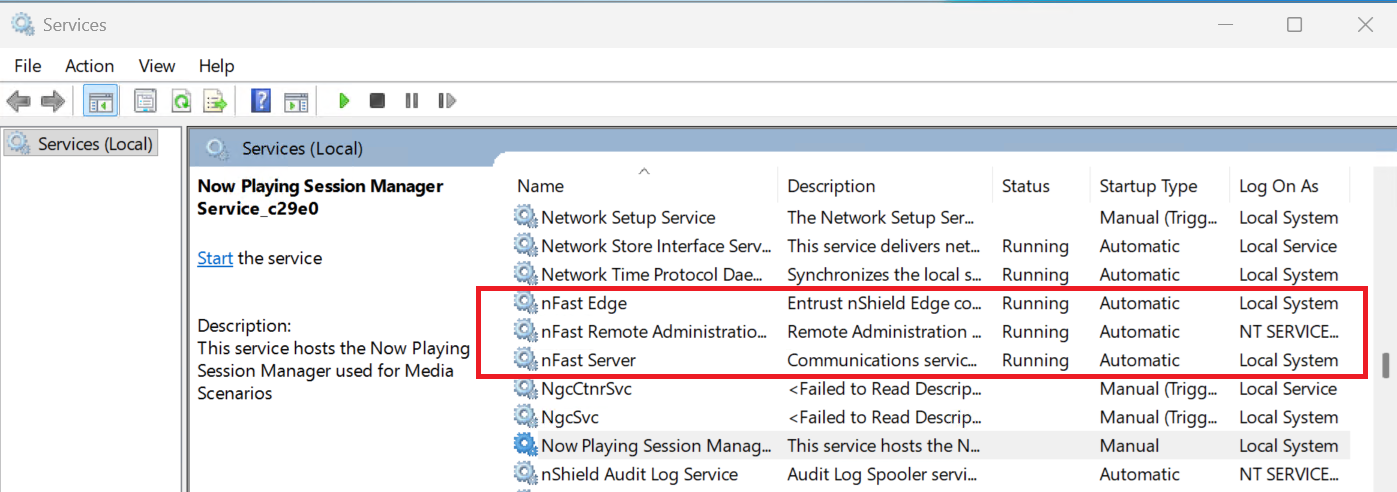
Create a security world
-
Set the HSM to initialization mode. See Using the nShield Edge for reference.
-
Create your Security World if one does not already exist or copy an existing one. Follow your organization’s security policy when creating a Security World. For more information see Create a new Security World.
The administrator card set (ACS) cards cannot be duplicated after the Security World is created. You may want to create extras in case of a card failure or a lost card. You will now be prompted to insert N blank/new/formatted smartcards. In turn, have your ACS custodians present their allocated card, noting the serial number of the smartcard and the corresponding passphrase. Each card and passphrase should be stored in separate tamper-resistant envelopes and should be dated and signed. The cards and passphrases should not be sealed until the end of the tenant key ceremony, in case they are needed later during the ceremony. -
Once the command exits, set the HSM to operational mode.
-
Confirm the Security World is Usable:
>nfkminfo
World
 generation  2
 state       0x3737000c Initialised Usable ...
 ...
Module #1
 generation 2
 state      0x2 Usable
 ...
Install the Cloud Integration Option Pack (CIOP)
-
Install the CIOP. For detailed instructions see CIOP v2.3.0 Install and User Guide.
For example:
C:\Users\Administrator\Downloads\CIOP-2.3.0\CIOP-2.3.0>"%NFAST_HOME%\python3\python.exe" -m pip install nshield_citool-2.3.0-py3-none-any.whl Processing c:\users\administrator\downloads\ciop-2.3.0\ciop-2.3.0\nshield_citool-2.3.0-py3-none-any.whl Requirement already satisfied: nfpython>=1.0.1 in c:\program files\ncipher\nfast\python3\lib\site-packages (from nshield-citool==2.3.0) (13.6.12) Requirement already satisfied: asn1crypto>=1.4.0 in c:\program files\ncipher\nfast\python3\lib\site-packages (from nshield-citool==2.3.0) (1.5.1) Installing collected packages: nshield-citool WARNING: The script cloud_integration_tool.exe is installed in 'C:\Program Files\nCipher\nfast\python3\Scripts' which is not on PATH. Consider adding this directory to PATH or, if you prefer to suppress this warning, use --no-warn-script-location. Successfully installed nshield-citool-2.3.0 [notice] A new release of pip is available: 24.0 -> 25.3 [notice] To update, run: C:\Program Files\nCipher\nfast\python3\python.exe -m pip install --upgrade pip C:\Users\Administrator\Downloads\CIOP-2.3.0\CIOP-2.3.0>"C:\Program Files\nCipher\nfast\python3\python.exe" -m pip install --upgrade pip Requirement already satisfied: pip in c:\program files\ncipher\nfast\python3\lib\site-packages (24.0) Collecting pip Downloading pip-25.3-py3-none-any.whl.metadata (4.7 kB) Downloading pip-25.3-py3-none-any.whl (1.8 MB) ━━━━━━━━━━━━━━━━━━━━━━━━━━━━━━━━━━━━━━━━ 1.8/1.8 MB 6.6 MB/s eta 0:00:00 Installing collected packages: pip Attempting uninstall: pip Found existing installation: pip 24.0 Uninstalling pip-24.0: Successfully uninstalled pip-24.0 WARNING: The scripts pip.exe, pip3.11.exe and pip3.exe are installed in 'C:\Program Files\nCipher\nfast\python3\Scripts' which is not on PATH. Consider adding this directory to PATH or, if you prefer to suppress this warning, use --no-warn-script-location. Successfully installed pip-25.3 -
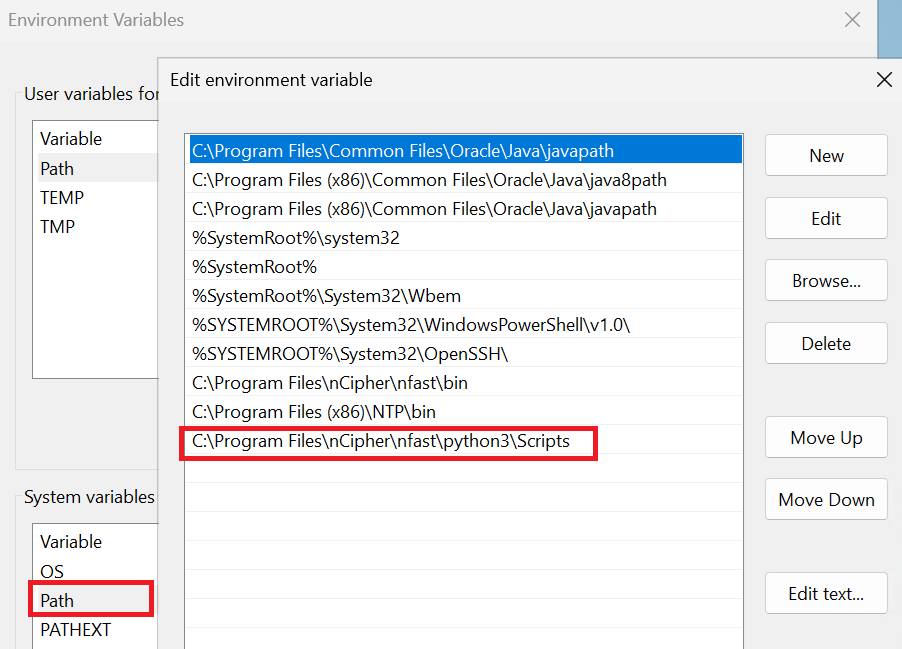
Add
C:\Program Files\nCipher\nfast\python3\Scriptsto the system path as suggested above.