Upload the wrapped key to Azure
All procedures in this section should be completed on the online computer.
-
Open a PowerShell console with administrator privileges.
-
Connect to Azure using the
azcommand.> az login --tenant <tenant-id> -
Enter the following command to upload the wrapped key.
> az keyvault key import --vault-name <vault-name> --name <target-key-name> --byok-file <key-transfer-package>For example:
> az keyvault key import --vault-name nShieldHSMBYOKKeyVault --name mykey2azure --byok-file KeyTransferPackage-mykey2azure.byok { "attributes": { "created": "2025-12-04T19:41:30+00:00", "enabled": true, "expires": null, "exportable": false, "hsmPlatform": "2", "notBefore": null, "recoverableDays": 90, "recoveryLevel": "Recoverable+Purgeable", "updated": "2025-12-04T19:41:30+00:00" }, "key": { "crv": null, "d": null, "dp": null, "dq": null, "e": "AQAB", "k": null, "keyOps": [ "encrypt", "decrypt", "sign", "verify", "wrapKey", "unwrapKey" ], "kid": "https://nshieldhsmbyokkeyvault.vault.azure.net/keys/mykey2azure/ac79c317b36546808661db25c6e20cf5", "kty": "RSA-HSM", "n": "yfMIHuv6Mjz/+nkS5nxMxR/uFoA5MkoUc7me3awgKkLh2vvDZidsz1e6Rw0qJ31VVV/P+g6YZXSHOYrrKJHDSBb73FDqOMWzQQYTheEhSwMLIgF9Gy2S7kQuR32jPO82f/g41ItPf9vL7KC51z3RhKPUjISpa/9O6SpIMBWEhVn6FgY8PlV9CqB0GHKGTw7X/MhRXh7Nt1BA1yOuotEzgeNkoKetemAgnA888JbWzCCcIfUgUzB/Hixo/3aoR6HJOHPGeTBKR+AKV8mGmw4o0AQcfxOSZJVsYlnyzfPTXTw9q9q3XU0FG1lp2fLl/VmWBGiomZr2ad/8MFgCrQsDPw==", "p": null, "q": null, "qi": null, "t": null, "x": null, "y": null }, "managed": null, "releasePolicy": null, "tags": null } -
Sign in to the Azure WebGUI.
-
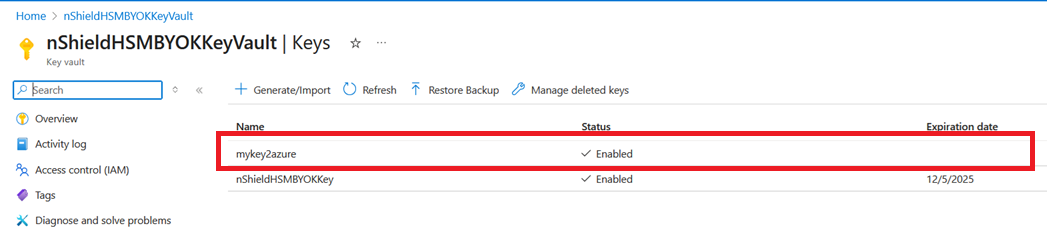
Verify your key has been uploaded to the Azure key vault.