Architecture overview
The following diagram illustrates the architecture between the AWS KMS API interface to the nShield HSM.
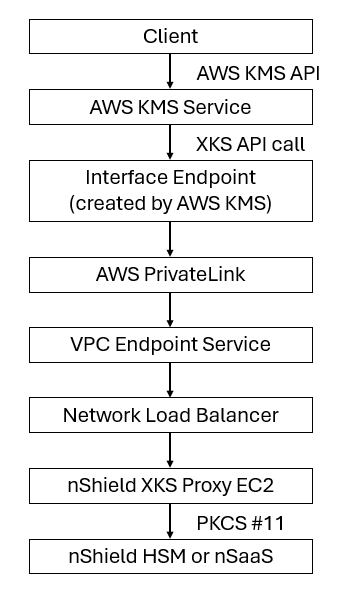
nShield HSM or nSaaS
The AWS security group must allow Custom TCP inbound and outbound traffic to and from the nShield HSM or nSaaS IP address. Multiple nShield HSMs can be deployed to provide high availability (HA) and increased throughput.
nShield XKS proxy EC2 instance
The minimum supported EC2 instance type is t3.large. More powerful EC2 instance types may also be used based on performance and capacity requirements.
Network load balancer
The target group associated with the Network Load Balancer (NLB) must have the following characteristics:
| Parameter | Value |
|---|---|
Target type |
Instances |
Protocol |
TCP, port 443 |
IP address type |
IPv4 |
Health check protocol |
HTTP |
Health check path |
/ping |
Advanced health check settings port |
Override, port 80 |
Register targets |
nShield XKS proxy EC2 |
The NLB must have the following characteristics:
| Parameter | Value |
|---|---|
Type |
Network |
Scheme |
Internet-facing |
IP address type |
IPv4 |
Availability Zones |
Minimum of two zones |
Listeners |
TCP, port 443 |
Cross-zone load balancing |
On |
VPC endpoint service
The VPC endpoint service must have the following characteristics:
| Parameter | Value |
|---|---|
Load balancer type |
Network |
Supported regions |
Minimum of two (2) |
Acceptance required |
Unchecked |
Supported IP address types |
IPv4 |
Allow principals |
Your primary zone |
Private DNS name |
Common name (CN) of nShield XKS proxy EC2 |
Key Administrators: AWS IAM user
To enable the integration, you must designate an IAM user as the key administrator. This user will be responsible for managing the AWS KMS key and performing key administration tasks. The user may also be granted permissions to use the KMS key for cryptographic operations, as required by your organization’s security policies.
You can either select an existing IAM user or create a new one. When creating an access key for the IAM user, select Application running outside AWS as the use case to align with AWS access key best practices.
Security rule for the health check and XKS traffic
Add the following rules to the security group’s inbound and outbound rule sets to allow health check and XKS traffic.
| Parameter | Value |
|---|---|
Type |
HTTP |
Protocol |
TCP |
Port |
80 |
Source |
IPv4 CIDR of your VPC, for example, 10.0.0.0/16 |
Description |
NLB health check |
| Parameter | Value |
|---|---|
Type |
HTTPS |
Protocol |
TCP |
Port |
443 |
Source |
IPv4 CIDR of your VPC, for example, 10.0.0.0/16 |
Description |
NLB XKS traffic |