Integrate Cryptographic Security Platform Key Management Vault with NetApp ONTAP
Create the Cryptographic Security Platform Key Management Vault client certificate bundle
KMIP communications between the KMIP Key Management Vault and the NetApp ONTAP application require certificates. Use the built-in capabilities of Cryptographic Security Platform Key Management Vault to create and publish the certificate.
Generate a CSR on NetApp and use it here to create the certificate. NetApp generates the key, and only a client with the key can connect to the KMIP server. This provides a more controlled environment where the customer can control which clients can connect to the KMIP server and access the keys.
-
Open a command window and sign in to the NetApp ONTAP Cluster Management.
% ssh admin@xxx.xxx.xxx.xxx -
Generate a CSR:
mycluster::> security certificate generate-csr -common-name netapp-ontap -size 4096 -country US -state Florida -locality Sunrise -organization Hurricanes

Certificate Signing Request :
-----BEGIN CERTIFICATE REQUEST-----
MIIE4jCCAsoCAQAwXTEVMBMGA1UEAxMMbmV0YXBwLW9udGFwMQswCQYDVQQGEwJV
UzEQMA4GA1UECBMHRmxvcmlkYTEQMA4GA1UEBxMHU3VucmlzZTETMBEGA1UEChMK
SHVycmljYW5lczCCAiIwDQYJKoZIhvcNAQEBBQADggIPADCCAgoCggIBAM15HBg3
5/bBVJTM7lOndqEbtMgayuJQnJURRDmDpMvcK/h+Jn4NkXTbWEsVVoNVD/8G762k
tqpR3Uh7txSG9MdRfdeyi7EayOLn
.
.
lvzprp6tloNvy4oXiEm+5l8HEj6jKDQkP4CdbW+BhutYKBYVdvs3WwV+ULUv8hcH
PIHrVZa2
-----END CERTIFICATE REQUEST-----


Private Key :
-----BEGIN PRIVATE KEY-----
MIIJQgIBADANBgkqhkiG9w0BAQEFAASCCSwwggkoAgEAAoICAQDNeRwYN+f2wVSU
zO5Tp3ahG7TIGsriUJyVEUQ5g6TL3Cv4fiZ+DZF021hLFVaDVQ//Bu+tpLaqUd1I
.
.
0gN2EblsgJ1ZPgBKK+yLNKYTPvORQw==
-----END PRIVATE KEY-----

Note: Keep a copy of your certificate request and private key for future reference.
Store the CSR certificate as
netapp.csr. -
Sign in to the KMIP Vault with the URL and credentials provided when you created the KMIP vault.
-
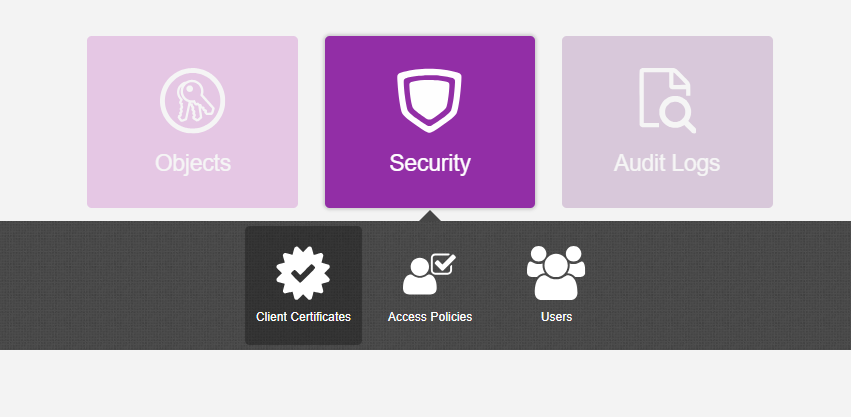
Select Security, then Client Certificates.
-
In the Manage Client Certificate page, select the + icon on the right to create a new certificate. The Create Client Certificate dialog box appears.
-
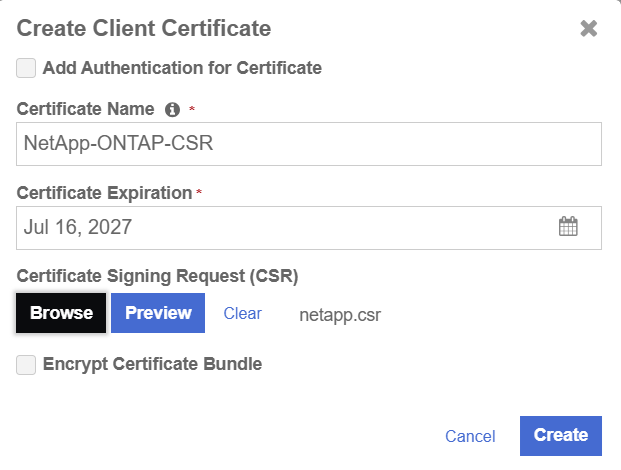
In the Create Client Certificate dialog box:
-
Enter the certificate name.
-
Enter the expiration date.
-
For the Certificate Signing Request (CSR) field, browse for your
netapp.csrfile. -
Select Create.
For example:
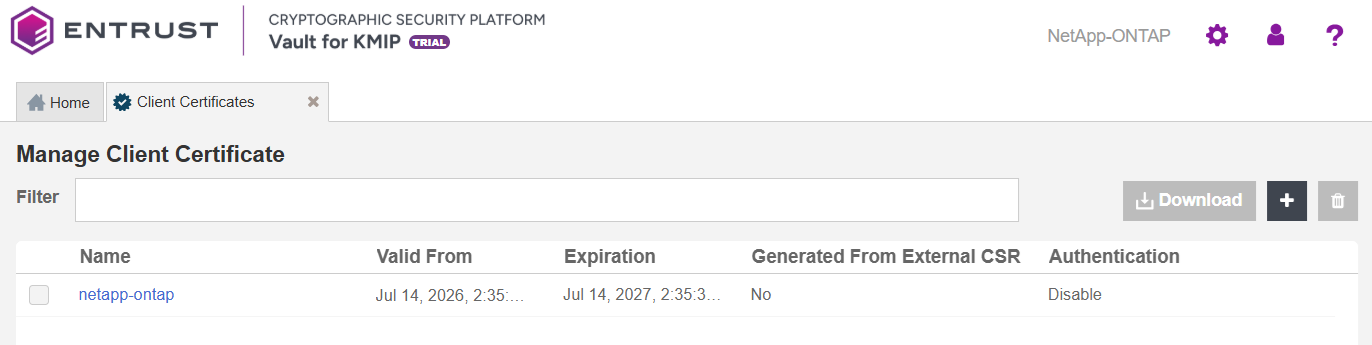
The new certificates are added to the Manage Client Certificate pane.
-
-
Select the certificate and then select the Download icon to download the certificate.
-
Unzip the downloaded file.
% unzip netapp-ontap_2026-07-14-18-37-32.zip
Archive:  netapp-ontap_2026-07-14-18-37-32.zip
  inflating: netapp-ontap.pem
  inflating: cacert.pem
It contains the following items:
-
A
certname.pemfile that includes both the client certificate and private key. In this example, the file is callednetapp-ontap.pem.The client certificate section of the
certname.pemfile includes the lines “-----BEGIN CERTIFICATE-----" and “-----END CERTIFICATE-----" and all text between them.The private key section of the
certname.pemfile includes the lines “-----BEGIN PRIVATE KEY-----" and “-----END PRIVATE KEY-----" and all text in between them. -
A
cacert.pemfile that is the root certificate for the KMS cluster. It is always namedcacert.pem.
-
-
These files are used to establish trust between Cryptographic Security Platform Key Management Vault and NetApp.
For more information about creating a certificate bundle, refer to Establishing a Trusted Connection with a Cryptographic Security Platform Key Management Vault Generated CSR.
Install the Cryptographic Security Platform Key Management Vault client bundle into NetApp ONTAP
-
Open a command window and sign in to the NetApp ONTAP Cluster Management.
% ssh admin@xxx.xxx.xxx.xxx -
Install the Cryptographic Security Platform Key Management Vault Client Certificate into NetApp ONTAP.
When prompted for the certificate section, copy it from the
netapp-ontap.pemfile. When prompet for the private key section, copy it from thenetapp.csrfile used to store the CSR. This is the private key that was created when you generated the NetApp CSR.mycluster::> security certificate install -vserver mycluster -type client -subtype kmip-cert Please enter Certificate: Press <Enter> when done -----BEGIN CERTIFICATE----- MIIEaDCCA1CgAwIBAgIEfhphJTANBgkqhkiG9w0BAQsFADBXMQswCQYDVQQGEwJV . . . RMM5ZEqIjkwJh1CurTN5JuLFZPYV9zNNHKKEiQ== -----END CERTIFICATE----- Please enter Private Key: Press <Enter> when done -----BEGIN PRIVATE KEY----- MIIJQwIBADANBgkqhkiG9w0BAQEFAASCCS0wggkpAgEAAoICAQCj7+BP2YfDiUiW . . . T0ScRW+7m8qKuyJCbC7oLyEaeuMcU/A= -----END PRIVATE KEY----- Enter certificates of certification authorities (CA) which form the certificate chain of the client certificate. This starts with the issuing CA certificate of the client certificate and can range up to the root CA certificate. Do you want to continue entering root and/or intermediate certificates {y|n}: n You should keep a copy of the private key and the CA-signed digital certificate for future reference. The installed certificate's CA and serial number for reference: CA: HyTrust KeyControl Certificate Authority serial: 732B155A The certificate's generated name for reference: netapp-ontap -
Make a note of the certificate’s generated name above, for example, netapp-ontap. It will be needed in section Set up Cryptographic Security Platform Key Management Vault as the external KMIP server.
Set up Cryptographic Security Platform Key Management Vault as the external KMIP server
-
Open a command window and sign in to the NetApp ONTAP Cluster Management.
-
Enable the external KMIP server. Include the following arguments:
-
-client-cert: The name of the certificate that was generated in Install the Cryptographic Security Platform Key Management Vault client bundle into NetApp ONTAP, for example,netapp-ontap. -
-server-ca-certs: The name of the certificate that was generated in Deploy NetApp Simulate ONTAP, for example,INTEROP-ROOT-CA.Use the IP addresses of both nodes in the Key Management Vault cluster.
mycluster::> security key-manager external enable -key-servers xx.xxx.xxx.xxx:5696,xx.xxx.xxx.xxx:5696 -client-cert netapp-ontap -server-ca-certs INTEROP-ROOT-CAFor this integration test, only the primary Key Management Vault node’s IP address was used.
-
-
Verify that the external key-management is configured:
mycluster::> security key-manager external show-status

Node  Vserver  Primary Key Server                                 Status
----  -------  -------------------------------------------------  ------------
mycluster-01
      mycluster
               xx.xxx.xxx.xxx:5696                                available
               xx.xxx.xxx.xxx:5696                                available
2 entries were displayed.