Example of generation of public certificate
In this example, a web server named MyWebServer will request a public certificate from the KeyFactor EJBCA Enterprise CA created in Example of a root CA with PQC.
Create the certificate request
-
Create the private key for MyWebServer, for example, by logging in to MyWebServer and running the following command to create a key named
MyWebServer.key:>openssl genrsa -out MyWebServer.key 2048 -
Create the openssl configuration file, for example, save the following configuration as
MyWebServer.cnf.[ req ] default_bits = 2048 distinguished_name = req_distinguished_name req_extensions = req_ext prompt = no [ req_distinguished_name ] C = US ST = Florida L = Sunrise O = Example Company OU = IT Department CN = www.MyWebServer.com emailAddress = info@MyWebServer.com [ req_ext ] subjectAltName = @alt_names [ alt_names ] DNS.1 = www.MyWebServer.com DNS.2 = MyWebServer.com -
Create the certificate request:
>openssl req -new -key MyWebServer.key -out MyWebServer.csr -config MyWebServer.cnf -
Display the content of the certificate request:
>openssl req -new -key MyWebServer.key -out MyWebServer.csr -config MyWebServer.cnf

C:\Users\ramired1\Downloads>openssl req -text -noout -verify -in MyWebServer.csr
Certificate request self-signature verify OK
Certificate Request:
    Data:
        Version: 1 (0x0)
        Subject: C = US, ST = Florida, L = Sunrise, O = Example Company, OU = IT Department, CN = www.MyWebServer.com, emailAddress = info@MyWebServer.com
        Subject Public Key Info:
            Public Key Algorithm: rsaEncryption
                Public-Key: (2048 bit)
                Modulus:
                    00:e3:27:b2:02:1c:01:28:81:45:37:0e:d3:c7:de:

                    ...

                    22:6a:09:80:39:b1:ac:dc:18:8c:50:32:59:d1:5e:
                    c3:8b
                Exponent: 65537 (0x10001)
        Attributes:
            Requested Extensions:
                X509v3 Subject Alternative Name:
                    DNS:www.MyWebServer.com, DNS:MyWebServer.com
    Signature Algorithm: sha256WithRSAEncryption
    Signature Value:
        0b:73:13:3b:ef:dd:35:bd:6e:68:43:27:79:34:b3:1d:f1:87:

        ...

        98:02:d0:b7:e2:df:22:b7:cb:d3:67:07:f0:a0:65:30:9e:c1:
        01:dd:22:a7
Sign the certificate request
-
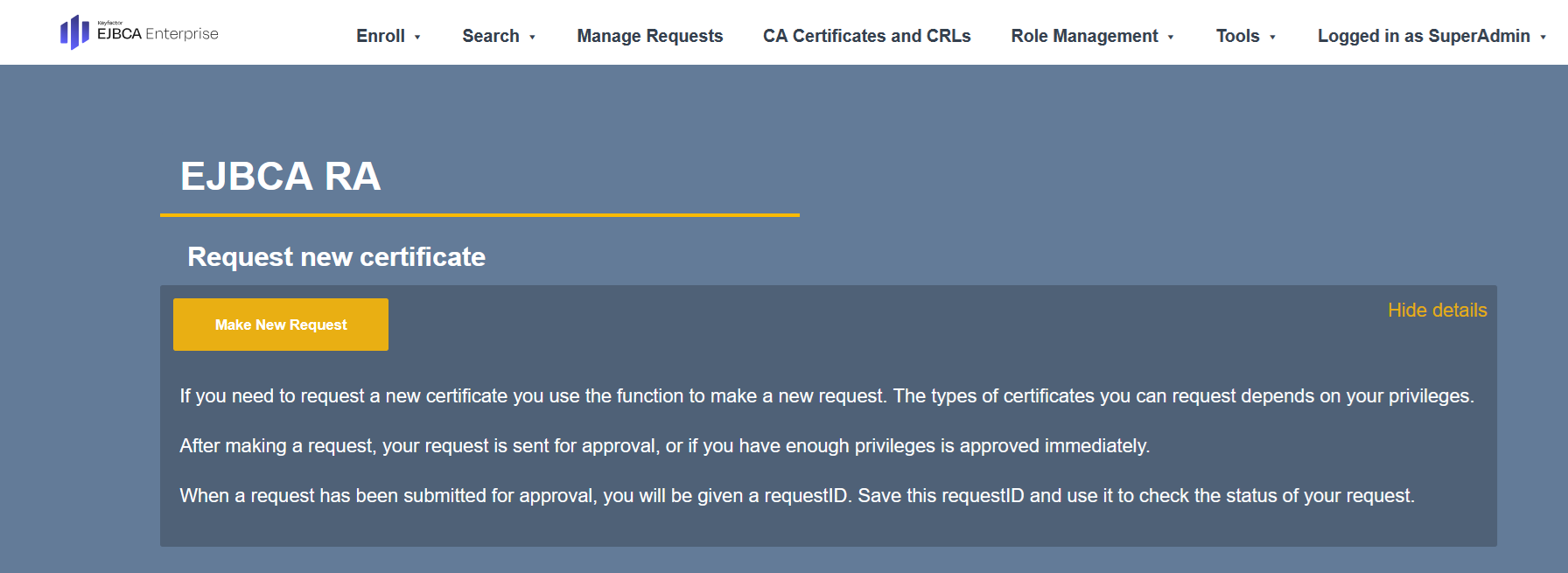
In a browser, navigate to http://<your-server-ip>/ejbca/ra.
-
Select Make New Request.
-
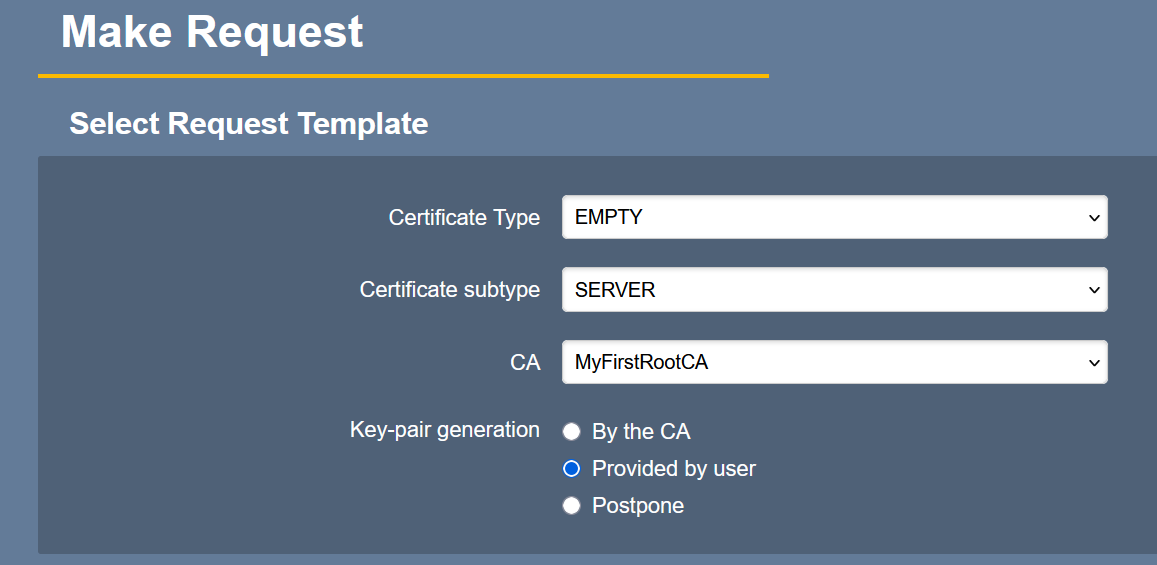
Select the following options:
-
Certificate Type: EMPTY
-
Certificate subtype: SERVER
-
CA: MyFirstRootCA
-
Key-pair generation: Provided by the user
-
-
Scroll down to Upload CSR and upload the CSR created in Create the certificate request.
-
Scroll down to Provide User Credentials and enter your credentials.
-
Scroll down and select Download PEM. A certificate file named
www.MyWebServer.com.pemis downloaded to your computer. -
Display the public certificate content:
>openssl x509 -text -noout -verify -in www.MyWebServer.com.pem
Certificate:
    Data:
        Version: 3 (0x2)
        Serial Number:
            71:d2:24:9a:e0:e6:07:62:af:39:40:82:8b:6a:c2:4e:14:04:55:3e
        Signature Algorithm: 2.16.840.1.101.3.4.3.19
        Issuer: C = SE, O = Keyfactor Community, CN = MyFirstRootCA
        Validity
            Not Before: Mar 16 18:35:35 2026 GMT
            Not After : Mar 15 18:35:34 2028 GMT
        Subject: C = US, ST = Florida, L = Sunrise, O = Example Company, OU = IT Department, CN = www.MyWebServer.com, emailAddress = info@MyWebServer.com
        Subject Public Key Info:
            Public Key Algorithm: rsaEncryption
                Public-Key: (2048 bit)
                Modulus:
                    00:e3:27:b2:02:1c:01:28:81:45:37:0e:d3:c7:de:

                    ...

                    22:6a:09:80:39:b1:ac:dc:18:8c:50:32:59:d1:5e:
                    c3:8b
                Exponent: 65537 (0x10001)
        X509v3 extensions:
            X509v3 Basic Constraints: critical
                CA:FALSE
            X509v3 Authority Key Identifier:
                98:51:FA:2D:B0:73:98:2B:F5:49:D9:D8:EE:90:3F:EF:7E:45:15:66
            X509v3 Subject Alternative Name:
                email:<username>@entrust.com, DNS:www.MyWebServer.com, DNS:MyWebServer.com
            X509v3 Extended Key Usage:
                TLS Web Server Authentication
            X509v3 Subject Key Identifier:
                8B:40:E5:B3:76:DD:A2:AA:96:00:50:E6:67:99:05:13:DF:9F:A2:F2
            X509v3 Key Usage: critical
                Digital Signature, Key Encipherment
...