Network setup for multi-tenancy on nShield 5s
The exact network setup required depends on:
-
Your existing network topology.
-
The operating system used by all the machines involved.
-
The constraints of your organization’s IT and security policies.
It is not possible to give exact instructions for all possible scenarios.
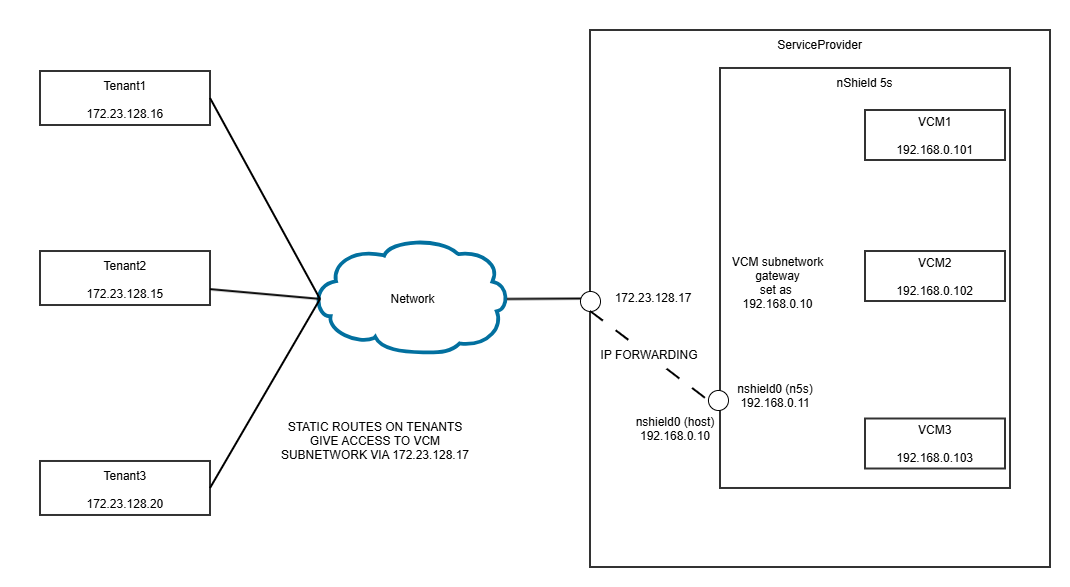
This chapter gives guidance and example commands to set up a network similar to the one in the following diagram on a Linux operating system:
| You might need to swap the commands in the examples here if you are using a non-Linux operating system. |
The aim is to establish routing between the tenant machines and the VCMs hosted within the Service provider’s nShield 5s HSM. This route enables packets to be sent back and forth between a tenant and their allocated VCM.
In this example network there are three tenants and a service provider all using physical machines that have IP addresses in the 172.23.128/24 subnetwork.
The service provider defines a 192.168.0/24 subnetwork for the VCMs.
In the service provider host machine the nShield 5s appears as device nshield0.
| If you later uninstall your system, you may need to reverse some of these network changes before you perform a new installation, otherwise you may get some failures in install scripts. Entrust recommends that you keep notes of any network changes that you make for reference when you uninstall and install the system. |
Configure the HSM: service provider
| It is the service provider’s responsibility to configure the networking of an HSM that will be used for multi-tenancy. This should be done before creating any VCMs. |
Define the VCM subnetwork
To define a VCM subnetwork:
-
On the HSM, run
hsmadmin setnetworkto configure the addressing. -
On the HSM, run
hsmadmin reset.
The service provider must define a subnetwork for the VCMs it will host. Each VCM will then be allocated an address within this subnetwork. The options available are:
-
IPv4 addressing
-
IPv6 addressing
-
IPv6 link local addressing
IPv4 and IPv6 define an IP address for the HSM, which is currently unused, and a network mask that determines the number of VCM addresses available. When VCMs are created they can be freely allocated any unused IP address on this subnetwork.
IPv6 link local can be used when the tenants and service provider are hosted on the same physical machine. Because a tenant host machine can only have one active VCM hosted on a given HSM, this solution is only useful for multi-tenant operation if the tenant host machines are containerised by use of Docker containers or a similar technology.
| Once the VCM subnetwork has been defined the HSM must be reset using hsmadmin reset so that the settings will be applied to any VCMs that are created. |
| You cannot change network settings for VCMs that have already been created. If you wish to change your network setup you should first delete any existing VCMs, change your network settings, reset the HSM and then create new VCMs. |
The following example command defines a VCM subnetwork with 256 addresses, 192.168.0.0 to 192.168.0.255. The address 192.168.0.11 is allocated to the HSM and 192.168.0.255 would be the subnet broadcast address. VCMs can be allocated to any of the other addresses, although one address will be needed for the host interface.
sudo /opt/nfast/bin/hsmadmin setnetwork --esn E1CF-F3BB-2811 ipv4static --address 192.168.0.11/24 --gateway 192.168.0.10Define the nshield interface
If you are not using link-local addressing, the nshield interface on the host machine in which the HSM is
installed, for example nshield0, must be assigned an unused IP address on the VCM subnetwork, for example:
sudo ip addr add 192.168.0.10/24 dev nshield0| Ensure that the method you use for assigning the address will survive a reboot of the machine. |
If you uninstall the Security World software, the nshield interface will be removed when the
driver is uninstalled and if you subsequently reinstall the software you must issue this command
again.
|
Enable IP forwarding
IP packets must be forwarded between the externally routable IP address of the machine hosting the HSM and the VCM subnetwork, for example:
sudo sysctl net.ipv4.ip_forward=1
sudo sysctl -w net.ipv4.conf.all.forwarding=1| These example commands are very permissive and suitable only for a private network. Your IT or security department might require you to implement something more restrictive depending on the network you are using. |
Configure firewall
Your firewall must be configured to allow packets to flow between your tenants and their VCMs. The ports used by services within the VCM can be found in the configuration file, which is automatically generated when the VCM is created. The ports currently used are:
| Service | Port |
|---|---|
sshadmin |
2201 |
ncoreapi |
2203 |
monitor |
2206 |
An example command to configure the firewall is:
sudo iptables -A FORWARD -j ACCEPT| Ensure that the method you use for IP forwarding will survive a reboot of the machine. |
| This example command is very permissive and suitable only for a private network. Your IT or security department might require you to implement something more restrictive depending on the network you are using. |
Create a route from the tenant to the HSM: tenant
The service provider’s machine that hosts the HSM acts as the gateway into the VCM subnetwork. The tenant should create a static route to the externally routable IP address of the machine that hosts the HSM. This provides the routing entry for the VCM subnetwork.
For example:
sudo ip route add 192.168.0.0/24 via 172.23.128.17In the example here, 172.23.128.17 is the IP address of the service provider’s machine that hosts the HSM.
| Ensure that the method you use for creating the static route will survive a reboot of the machine. |